

Spring 3 MVC Tutorial

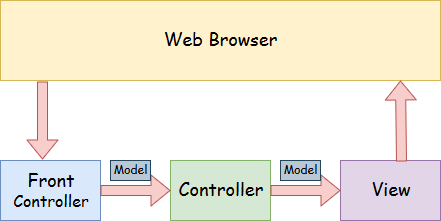
Spring 3 MVC provides an elegant solution to use MVC with spring. In Spring Web MVC, DispatcherServlet class works as the front controller. The @Contoller annotation is used to mark the class as the controller in Spring 3.

Spring 3 MVC example

Understading the flow of Spring 3 Web MVC

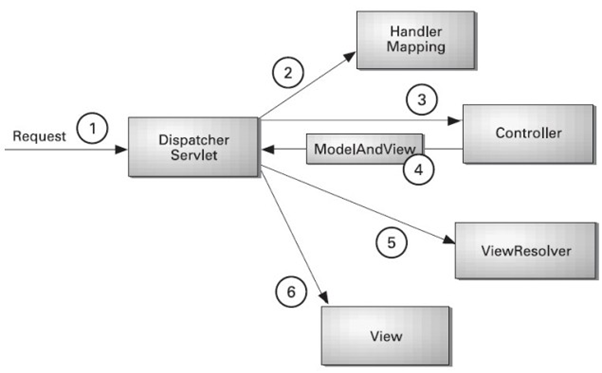
As displayed in the figure, all the incoming request is intercepted by the DispatcherServlet that works as the front controller. The DispatcherServlet gets entry of handler mapping from the xml file and forwards the request to the controller. The controller returns an object of ModelAndView. The DispatcherServlet checks the entry of view resolver in the xml file and invokes the specified view component.


Example of Spring 3 Web MVC

Let's see the simple example of spring 3 web MVC. There are given 7 steps for creating the spring MVC application. The steps are as follows:

  1. Create the request page (optional)
  2. Create the controller class
  3. Provide the entry of controller in the web.xml file
  4. Define the bean in the xml file
  5. Display the message in the JSP page
  6. Load the spring core and mvc jar files
  7. Start server and deploy the project


Required Jar files

To run this example, you need to load:

  • Spring Core jar files
  • Spring Web jar files

download all the jar files for spring including core, web, aop, mvc, j2ee, remoting, oxm, jdbc, orm etc.


1) Create the request page (optional)

This is the simple jsp page containing a link. It is optional page. You may direct invoke the action class instead.

index.jsp
<a href="hello.html">click</a>

2) Create the controller class

To create the controller class, we are using two annotations @Controller and @RequestMapping.

The @Controller annotation marks this class as Controller.

The @Requestmapping annotation is used to map the class with the specified name.

This class returns the instance of ModelAndView controller with the mapped name, message name and message value. The message value will be displayed in the jsp page.

HelloWorldController.java
package com.javatpoint;
import org.springframework.stereotype.Controller;
import org.springframework.web.bind.annotation.RequestMapping;
import org.springframework.web.servlet.ModelAndView;

@Controller
public class HelloWorldController {

	@RequestMapping("/hello")
	public ModelAndView helloWorld() {

		String message = "HELLO SPRING MVC HOW R U";
		return new ModelAndView("hellopage", "message", message);
	}
	
}

3) Provide the entry of controller in the web.xml file

In this xml file, we are specifying the servlet class DispatcherServlet that acts as the front controller in Spring Web MVC. All the incoming request for the html file will be forwarded to the DispatcherServlet.

web.xml
<?xml version="1.0" encoding="UTF-8"?>
<web-app version="2.5" 
	xmlns="http://java.sun.com/xml/ns/javaee" 
	xmlns:xsi="http://www.w3.org/2001/XMLSchema-instance" 
	xsi:schemaLocation="http://java.sun.com/xml/ns/javaee 
	http://java.sun.com/xml/ns/javaee/web-app_2_5.xsd">
  
 <servlet>
	<servlet-name>spring</servlet-name>
	<servlet-class>org.springframework.web.servlet.DispatcherServlet</servlet-class>
	<load-on-startup>1</load-on-startup>
</servlet>
	
<servlet-mapping>
	<servlet-name>spring</servlet-name>
	<url-pattern>*.html</url-pattern>
</servlet-mapping>
	
</web-app>


4) Define the bean in the xml file

This is the important configuration file where we need to specify the ViewResolver and View components.

The context:component-scan element defines the base-package where DispatcherServlet will search the controller class.

Here, the InternalResourceViewResolver class is used for the ViewResolver.

The prefix+string returned by controller+suffix page will be invoked for the view component.

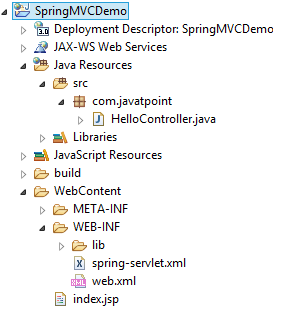
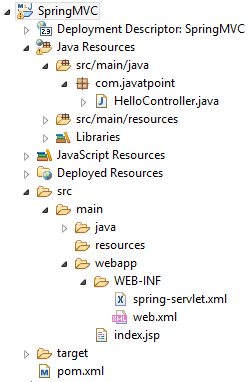
This xml file should be located inside the WEB-INF directory.

spring-servlet.xml
<?xml version="1.0" encoding="UTF-8"?>
<beans xmlns="http://www.springframework.org/schema/beans"
	xmlns:xsi="http://www.w3.org/2001/XMLSchema-instance"
	xmlns:p="http://www.springframework.org/schema/p"
	xmlns:context="http://www.springframework.org/schema/context"
	xsi:schemaLocation="http://www.springframework.org/schema/beans
http://www.springframework.org/schema/beans/spring-beans-3.0.xsd
http://www.springframework.org/schema/context
http://www.springframework.org/schema/context/spring-context-3.0.xsd">

	<context:component-scan	base-package="com.javatpoint" />
		
	<bean class="org.springframework.web.servlet.view.InternalResourceViewResolver">
	
		<property name="prefix" value="/WEB-INF/jsp/" />
		<property name="suffix" value=".jsp" />
	</bean>
	
</beans>


5) Display the message in the JSP page

This is the simple JSP page, displaying the message returned by the Controller.

It must be located inside the WEB-INF/jsp directory for this example only.

hellopage.jsp
Message is: ${message}

6) Load the jar files required for spring MVC framework

We have created this application in myeclipse IDE which already provides the jar files. If you use eclipse or other IDE's, you need to load the jar file for spring MVC.


Spring 3 MVC Multiple Controller Example

We can have a lot of controller classes in Spring Framework. In this example, we are creating two Controller classes HelloWorldController and WelcomeWorldController.

1) Controller Classes

HelloWorldController.java
package com.javatpoint;
import org.springframework.stereotype.Controller;
import org.springframework.web.bind.annotation.RequestMapping;
import org.springframework.web.servlet.ModelAndView;

@Controller
public class HelloWorldController {

	@RequestMapping("/hello")
	public ModelAndView helloWorld() {

		String message = "HELLO SPRING MVC";
		return new ModelAndView("hellopage", "message", message);
	}
	
}
HelloWorldController.java
package com.javatpoint;
import org.springframework.stereotype.Controller;
import org.springframework.web.bind.annotation.RequestMapping;
import org.springframework.web.servlet.ModelAndView;

@Controller
public class WelcomeWorldController {

	@RequestMapping("/welcome")
	public ModelAndView helloWorld() {

		String message = "WELCOME SPRING MVC";
		return new ModelAndView("welcomepage", "message", message);
	}
	
}

2) View components

To run this example, It must be located inside the WEB-INF/jsp directory.

hellopage.jsp
Message is: ${message}
welcomepage.jsp
Message is: ${message}

3) Index page

It is the optional welcome page, that provide the links to invoke both controller.

index.jsp
<a href="hello.html">click</a>|
<a href="welcome.html">click</a>

Other pages are same e.g. spring-servlet.xml and web.xml.